
오늘은 몰랐으면 내일은 알면 된다
[Angular] AngularJS 튜토리얼 10. 서비스(Services) 본문
[ 서비스란? ]
: AngularJS 애플리케이션 한정으로 사용할 수 있는 함수나 객체를 의미한다.
$locaion 포함 30가지 정도의 built-in 서비스가 있다.
$location은 현재 웹페이지의 위치정보(url)를 반환하는 메서드를 가지고 있다. (window.location과 비슷함)
<body ng-app="myApp">
	<h1 ng-controller="customersCtrl">{{myUrl}}</h1>
	<script>
		var app = angular.module('myApp',[]);

		app.controller('customersCtrl', function($scope, $location) {
			$scope.myUrl = $location.absUrl();;
		});
	</script>
</body>
서비스를 컨트롤러에서 사용하기 위해서는 의존성 정의가 되어야한다. (it must be defined as a dependency.)
컨트롤러 객체에 매개변수로 넘기든지 해서 DI해야한다는 뜻인 것 같다.
[ 서비스를 왜 사용하는가? ]
: $location 같은 경우에는 이미 DOM 내에 존재하는 window.location 객체를 사용하면 될 것 같지만, AngularJS 애플리케이션 내에서 사용하는데에는 몇가지 제약이 있기때문에 service를 사용하는 것이 권장된다.
AngularJS는 지속적으로 애플리케이션을 주시하면서 이벤트나 변화를 관리하기 때문에, 적절한 동작을 위해서라도 service를 사용하는 편이 좋다.
[ $http 서비스 ]
: 가장 보편적으로 사용되는 서비스이다. 서버로 request를 보내고, 애플리케이션이 response를 다룰 수 있도록 해준다.
예를들어 서버에 이런 식으로 String 값을 반환해주는 메서드가 있다고 가정한다.
package com.angular.study;

import org.slf4j.Logger;
import org.slf4j.LoggerFactory;
import org.springframework.stereotype.Controller;
import org.springframework.web.bind.annotation.RequestMapping;
import org.springframework.web.bind.annotation.RequestMethod;
import org.springframework.web.bind.annotation.ResponseBody;

@Controller
public class HttpController {

	private static final Logger logger = LoggerFactory.getLogger(HttpController.class);

	@ResponseBody
	@RequestMapping(value = "/httpTest", method = RequestMethod.POST, produces = "application/text; charset=utf8")
	public String httpTest() {
		logger.info("httpTest invoked");
		return "Data From Server";
	}

}
jsp에서는 아래와 같이 작성했다.
<body ng-app="myApp">
	<h1 ng-controller="myCtrl">
	<script>
    	app.controller('myCtrl', function($scope, $http) {
			$http.post('/httpTest').then(function(response) {
				console.log(response);
			});
		});
	</script>
</body>
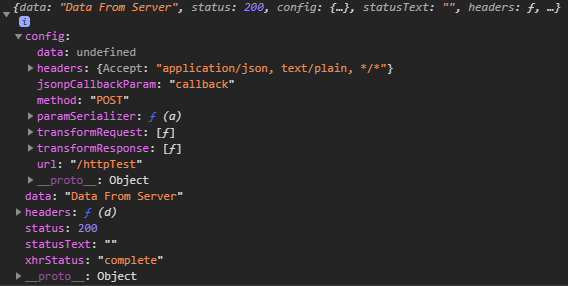
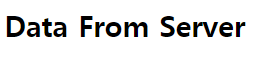
data: 에 서버에서 보낸 String 값이 들어있는 것을 확인할 수 있다. 간단한 활용법은 아래와 같다.
<body ng-app="myApp">
	<h1 ng-controller="myCtrl">{{dataStr}}</h1>
    <script>
    	app.controller('myCtrl', function($scope, $http) {
			$http.post('/httpTest').then(function(response) {
				$scope.dataStr = response.data;
			});
		});
	</script>
$http에 대한 내용은 튜토리얼 11에서 이어진다.
[ $timeout 서비스 ]
: window.setTimeout 함수의 AngularJS 버전이다.
	<h1 ng-app="myApp" ng-controller="myCtrl">{{myHeader}}</h1>

	<script>
		var app = angular.module('myApp',[]);
		app.controller('myCtrl', function($scope, $timeout) {
			$scope.myHeader = "Hello there!";
			$timeout(function() {
				$scope.myHeader = "How are you doing today?";
			}, 2000);
		});
	</script>
시간단위는 JS와 마찬가지로 1/1000초 이다. 위의 예시에서는 2초뒤 myHeader 값이 변경된다.


[ $interval 서비스 ]
: window.setInterval 함수의 AngularJS 버전이다.
<h1 ng-app="myApp" ng-controller="myCtrl">{{theTime}}</h1>
	<script>
		var app = angular.module('myApp',[]);
		app.controller('myCtrl', function($scope, $interval) {
			$scope.theTime = new Date().toLocaleTimeString();
			$interval(function(){
				$scope.theTime = new Date().toLocaleTimeString();
			},1000);
		});
	</script>

[ 커스텀 서비스 ]
: 커스텀 서비스와 모듈을 연결해서 사용할 수 있다.
16진법 숫자로 변경해주는 hexafy service를 만들어서 사용해보자.
커스텀 서비스는 $가 붙지 않는다.
	<h1 ng-app="myApp" ng-controller="myCtrl">{{hex}}</h1>
    <script>
		var app = angular.module('myApp',[]);
		app.controller('myCtrl', function($scope, hexafy) {
			$scope.hex = hexafy.myFunc(255);
		});

		app.service('hexafy', function(){
			this.myFunc = function(x) {
				return x.toString(16);
			}
		});
	</script>
[ 필터 내에서 커스텀 서비스를 사용하기 ]
: 서비스를 생성하여 애플리케이션에 연결하기만하면, 어떠한 컨트롤러, 디렉티브, 필터, 혹은 다른 서비스에서도 사용이 가능하다.
필터 내에서 서비스를 사용하기 위해서는 필터를 정의할때 dependency 를 추가해주어야 한다.
	<ul ng-app="myApp" ng-controller="myCtrl">
		<li ng-repeat="x in counts">{{x | myFormat}}</li>
	</ul>
    <script>
		var app = angular.module('myApp',[]);
		app.controller('myCtrl', function($scope) {
		    $scope.counts = [255, 251, 200];
		});

		app.filter('myFormat', ['hexafy', function(hexafy) {
			return function(x) {
				return hexafy.myFunc(x);
			}
		}]);

		app.service('hexafy', function(){
			this.myFunc = function(x) {
				return x.toString(16);
			}
		});

	</script>
'Front > Angular' 카테고리의 다른 글
| [Angular] AngularJS 튜토리얼 12. 테이블(Table) (0) | 2021.03.11 |
|---|---|
| [Angular] AngularJS 튜토리얼 11. AJAX - $http (0) | 2021.03.11 |
| [Angular] AngularJS 튜토리얼 9. 필터(Filters) (0) | 2021.03.11 |
| [Angular] AngularJS 튜토리얼 8. 스코프(Scope) (0) | 2021.03.10 |
| [Angular] AngularJS 튜토리얼 7. 컨트롤러(Controllers) (0) | 2021.03.10 |


